1
2
3
4
5
6
7
8
9
10
11
12
13
14
15
16
17
18
19
20
21
22
23
24
25
26
27
28
29
30
31
32
33
34
35
36
37
38
39
40
41
42
43
44
45
46
47
48
49
50
51
52
53
54
55
56
57
58
59
60
61
62
63
64
65
66
67
68
69
70
71
72
73
74
75
76
77
78
79
80
81
82
83
84
85
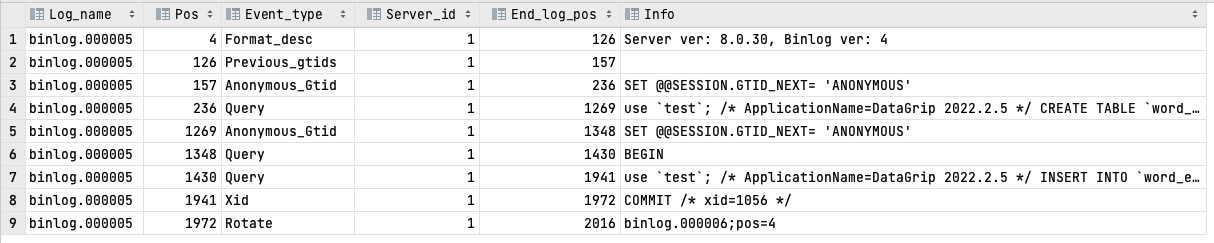
| ➜ mysql git:(stable) mysqlbinlog binlog.000005
# The proper term is pseudo_replica_mode, but we use this compatibility alias
# to make the statement usable on server versions 8.0.24 and older.
/*!50530 SET @@SESSION.PSEUDO_SLAVE_MODE=1*/;
/*!50003 SET @OLD_COMPLETION_TYPE=@@COMPLETION_TYPE,COMPLETION_TYPE=0*/;
DELIMITER /*!*/;
# at 4
#221129 13:58:35 server id 1 end_log_pos 126 CRC32 0x2edb0f3a Start: binlog v 4, server v 8.0.30 created 221129 13:58:35 at startup
ROLLBACK/*!*/;
BINLOG '
i5+FYw8BAAAAegAAAH4AAAAAAAQAOC4wLjMwAAAAAAAAAAAAAAAAAAAAAAAAAAAAAAAAAAAAAAAA
AAAAAAAAAAAAAAAAAACLn4VjEwANAAgAAAAABAAEAAAAYgAEGggAAAAICAgCAAAACgoKKioAEjQA
CigAAToP2y4=
'/*!*/;
# at 126
#221129 13:58:35 server id 1 end_log_pos 157 CRC32 0xfce57914 Previous-GTIDs
# [empty]
# at 157
#221129 14:01:57 server id 1 end_log_pos 236 CRC32 0x89886155 Anonymous_GTID last_committed=0 sequence_number=1 rbr_only=no original_committed_timestamp=1669701717173716 immediate_commit_timestamp=1669701717173716 transaction_length=1112
# original_commit_timestamp=1669701717173716 (2022-11-29 14:01:57.173716 CST)
# immediate_commit_timestamp=1669701717173716 (2022-11-29 14:01:57.173716 CST)
/*!80001 SET @@session.original_commit_timestamp=1669701717173716*//*!*/;
/*!80014 SET @@session.original_server_version=80030*//*!*/;
/*!80014 SET @@session.immediate_server_version=80030*//*!*/;
SET @@SESSION.GTID_NEXT= 'ANONYMOUS'/*!*/;
# at 236
#221129 14:01:57 server id 1 end_log_pos 1269 CRC32 0xc21f8573 Query thread_id=10 exec_time=0 error_code=0 Xid = 449
use `test`/*!*/;
SET TIMESTAMP=1669701717/*!*/;
SET @@session.pseudo_thread_id=10/*!*/;
SET @@session.foreign_key_checks=1, @@session.sql_auto_is_null=0, @@session.unique_checks=1, @@session.autocommit=1/*!*/;
SET @@session.sql_mode=1168113696/*!*/;
SET @@session.auto_increment_increment=1, @@session.auto_increment_offset=1/*!*/;
/*!\C utf8mb4 *//*!*/;
SET @@session.character_set_client=255,@@session.collation_connection=255,@@session.collation_server=255/*!*/;
SET @@session.lc_time_names=0/*!*/;
SET @@session.collation_database=DEFAULT/*!*/;
/*!80011 SET @@session.default_collation_for_utf8mb4=255*//*!*/;
/*!80013 SET @@session.sql_require_primary_key=0*//*!*/;
/* ApplicationName=DataGrip 2022.2.5 */ CREATE TABLE `word_en` (
`id` bigint(20) unsigned NOT NULL AUTO_INCREMENT COMMENT '主键',
`w_code` varchar(64) NOT NULL COMMENT 'code',
`word` varchar(64) NOT NULL COMMENT 'word',
`accent` varchar(64) NOT NULL COMMENT 'accent',
`mean_cn` varchar(1024) NOT NULL COMMENT 'mean_cn',
`mean_en` varchar(1024) DEFAULT NULL COMMENT 'mean_en',
`sentence` varchar(1024) DEFAULT NULL COMMENT 'sentence',
`sentence_trans` varchar(1024) DEFAULT NULL COMMENT 'sentence_trans',
`sentence_phrase` varchar(1024) DEFAULT NULL COMMENT 'sentence_phrase',
`word_etyma` varchar(1024) DEFAULT NULL COMMENT 'word_etyma',
`level` tinyint(4) NOT NULL DEFAULT '0' COMMENT 'level',
`weight` tinyint(4) NOT NULL DEFAULT '0' COMMENT 'weight',
PRIMARY KEY (`id`),
UNIQUE KEY `uk_code` (`w_code`),
KEY `idx_word` (`word`)
) ENGINE=InnoDB AUTO_INCREMENT=1 DEFAULT CHARSET=utf8mb4 COMMENT='英文词汇表'
/*!*/;
# at 1269
#221129 14:02:18 server id 1 end_log_pos 1348 CRC32 0xe7453964 Anonymous_GTID last_committed=1 sequence_number=2 rbr_only=no original_committed_timestamp=1669701738190811 immediate_commit_timestamp=1669701738190811 transaction_length=703
# original_commit_timestamp=1669701738190811 (2022-11-29 14:02:18.190811 CST)
# immediate_commit_timestamp=1669701738190811 (2022-11-29 14:02:18.190811 CST)
/*!80001 SET @@session.original_commit_timestamp=1669701738190811*//*!*/;
/*!80014 SET @@session.original_server_version=80030*//*!*/;
/*!80014 SET @@session.immediate_server_version=80030*//*!*/;
SET @@SESSION.GTID_NEXT= 'ANONYMOUS'/*!*/;
# at 1348
#221129 14:02:18 server id 1 end_log_pos 1430 CRC32 0x69617d57 Query thread_id=10 exec_time=0 error_code=0
SET TIMESTAMP=1669701738/*!*/;
BEGIN
/*!*/;
# at 1430
#221129 14:02:18 server id 1 end_log_pos 1941 CRC32 0xde97589f Query thread_id=10 exec_time=0 error_code=0
SET TIMESTAMP=1669701738/*!*/;
/* ApplicationName=DataGrip 2022.2.5 */ INSERT INTO `word_en`(`id`,`w_code`,`word`,`accent`,`mean_cn`,`mean_en`,`sentence`,`sentence_trans`,`sentence_phrase`,`word_etyma`,`level`,`weight`) VALUES (1,'get_close_(to)','get close (to)','/ɡet kloʊs tu/','phr. 接近','be close to','It wasn\'t until I got close to the end that I realized I had won the race.','直到我接近终点我才意识到我已经赢得了比赛。','','',1,0)
/*!*/;
# at 1941
#221129 14:02:18 server id 1 end_log_pos 1972 CRC32 0x3a770fbf Xid = 1056
COMMIT/*!*/;
# at 1972
#221129 20:08:35 server id 1 end_log_pos 2016 CRC32 0xf3d5585f Rotate to binlog.000006 pos: 4
SET @@SESSION.GTID_NEXT= 'AUTOMATIC' /* added by mysqlbinlog */ /*!*/;
DELIMITER ;
# End of log file
/*!50003 SET COMPLETION_TYPE=@OLD_COMPLETION_TYPE*/;
/*!50530 SET @@SESSION.PSEUDO_SLAVE_MODE=0*/;
|