hexo博客搭建记录
常用网址记录
搭建步骤
首先需要安装nodejs。验证脚本如下:
1 | ➜ forgblog git:(master) ✗ node -v |
安装hexo
1 | npm install hexo -g |
检查hexo是否安装成功
1 | ➜ forgblog git:(master) ✗ hexo -v |
初始化hexo文件夹
1 | hexo init |
在博客目录中安装所需要的组件
1 | npm install |
安装完成后创建新的文章
1 | $ hexo new "My New Post" |
More info: Writing
生成博客文件
1 | hexo g |
More info: Generating
启动服务
1 | hexo s |
More info: Server
发布到git 先安装依赖
1 | npm install hexo-deployer-git --save |
配置deploy
1 | deploy: |
然后执行
1 | $ hexo deploy |
More info: Deployment
主题配置
landscape-plus
代码相关样式文件
1 | /themes/landscape-plus/source/css/_partial/highlight.styl |
主题的相关变量文件
1 | themes/landscape-plus/source/css/_variables.styl |
next
安装主题
1 | git clone https://github.com/theme-next/hexo-theme-next themes/next |
是否启用动画
1 | themes/next/_config.yml |
样式修改./themes/next/source/css/_common/components/post/post-meta.styl 中 修改标题下留白。
1 | .posts-expand .post-meta { |
改成
1 | .posts-expand .post-meta { |
./themes/next/source/css/_common/components/post/post-button.styl 中 修改按钮留白。
1 | .post-button { |
改成
1 | .post-button { |
./themes/next/source/css/_schemes/Gemini/index.styl 中文章块下的留白。
1 | .post-block { |
改成
1 | .post-block { |
问题
Chinese TOC cannot jump
中文的目录无法跳转的问题,修改文件source/js/utils.js。修改内容见详情
https://github.com/theme-next/hexo-theme-next/pull/1540/files
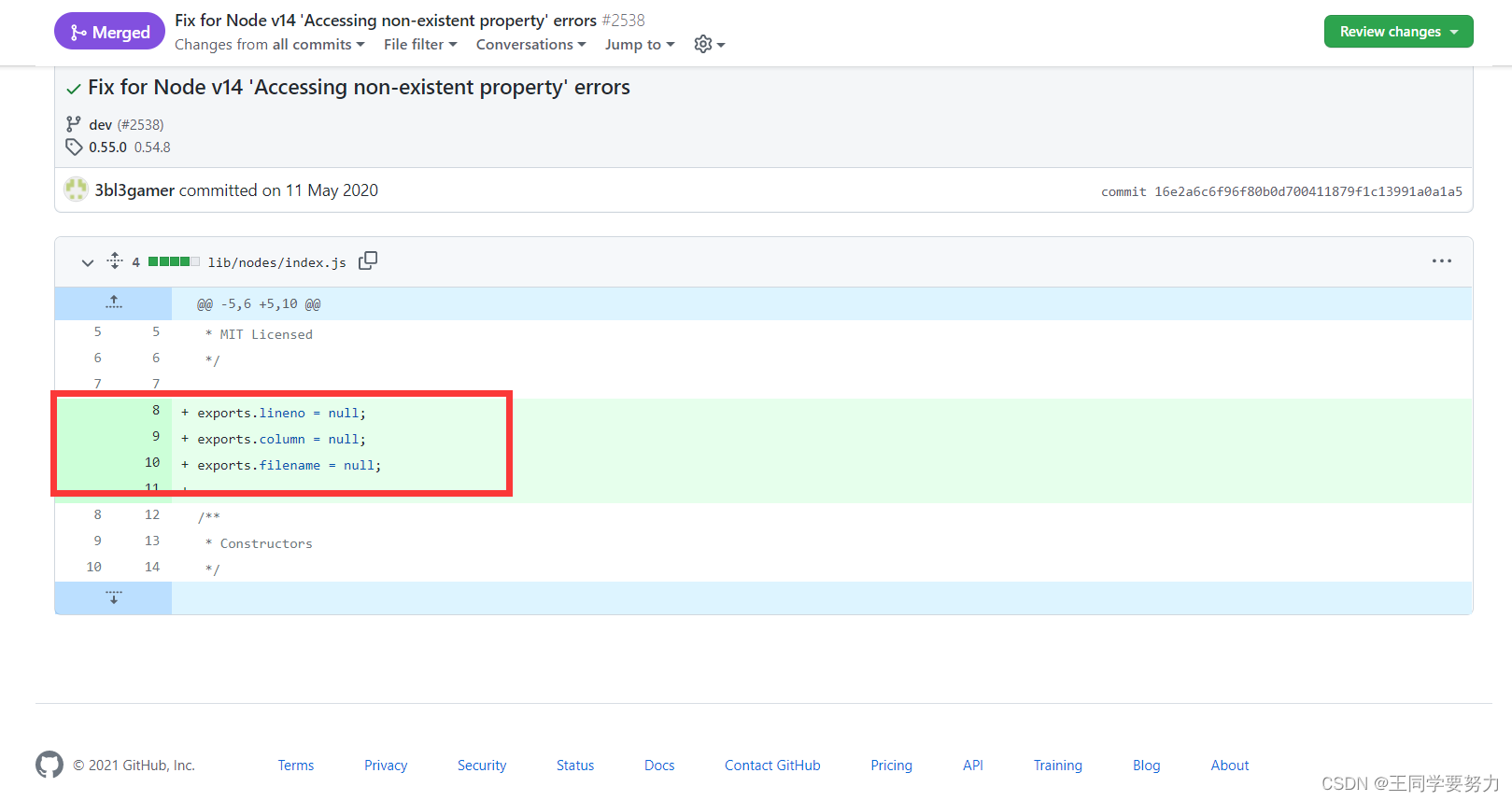
Accessing non-existent property
1 | INFO Hexo is running at http://localhost:4000/. Press Ctrl+C to stop. |
参考 https://github.com/stylus/stylus/pull/2538/commits/16e2a6c6f96f80b0d700411879f1c13991a0a1a5
修改.\node_modules\hexo-renderer-stylus\node_modules\stylus\lib\nodes\index.js.\node_modules\hexo-renderer-stylus\node_modules\nib\node_modules\stylus\lib\nodes\index.js
新增
1 | exports.lineno = null; |